What started as a grueling 17-hour Maven Analytics bootcamp turned into a full-blown obsession. As an Applied Math student, I had been trying to officially step into the world of business intelligence, real ETL pipelines, and insightful reporting (especially with interactive dashboards). This course was simply one of the best I've ever taken. It was a masterclass in Power BI, DAX, and the delicate art of transforming messy data into actionable, executive-level insights.
01. Taming the Chaos (ETL & Modeling)
I had built good-enough visuals with Matplotlib and R before, but beautiful visuals are useless if the engine beneath them is sputtering. The first phase of this project was pure "dirty work." I jumped into Power Query (M Code) to wrangle the raw CSVs, building robust ETL pipelines to clean, append, and merge the data into shape.
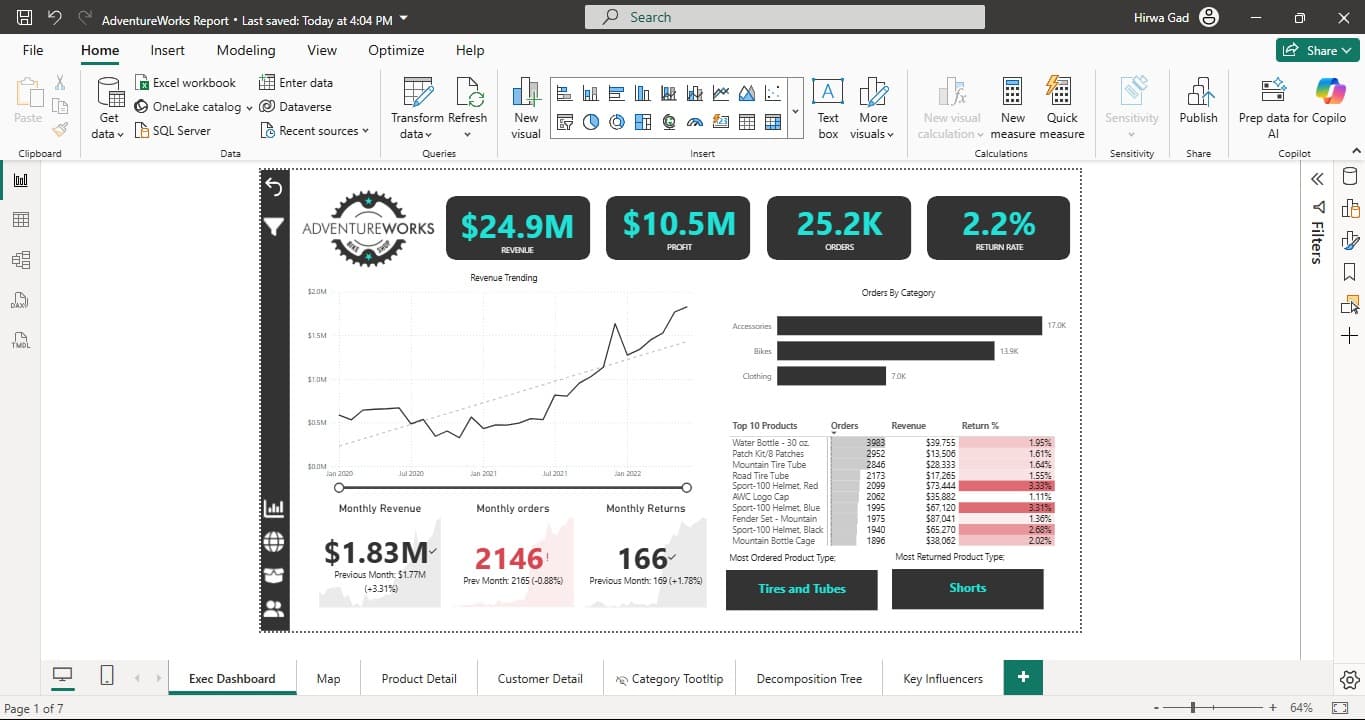
Once the data was pristine, I designed a hyper-optimized Star Schema in the model view. I locked down relationship cardinality and carefully controlled the bi-directional filter flow as I progressed through the course. Why? So when a hypothetical executive slices the data by "Married Homeowners," the entire $24.9M model instantly reacts without breaking a sweat.
02. DAX: The Brains Behind the Visuals
This is where the math major in me had the most fun. I bypassed Power BI's basic implicit measures entirely and authored heavy-duty Data Analysis Expressions (DAX) to control the exact mathematics of the dashboard.
- ▹Time Intelligence: I built rigorous formulas to calculate Year-over-Year (YoY) revenue growth and rolling averages dynamically. I also mastered rolling calendars and time-related iterating functions with help from Chris and Aaron from Maven.
- ▹Dynamic What-If Forecasting: Engineered interactive numeric parameters. Users can literally drag a slider to adjust global pricing and watch the adjusted profit margins recalculate in real-time, in milliseconds.
03. The Art of the Narrative (Explaining the Data)
One of the biggest wake-up calls in this course was realizing that all the DAX and Star Schemas in the world don't matter if the end-user doesn't know what they are looking at. Data without a story is just a spreadsheet.
I learned that it is absolutely essential to know how to explain insights. I went beyond basic charts and focused heavily on dashboard UX/UI. I implemented Bookmarks and page navigation to guide users through a logical flow. I built custom hidden Report Tooltips, so when a user hovers over a high-level bar chart, a granular weekly trend matrix seamlessly pops up. This phase taught me how to translate raw mathematical output into digestible, executive-speak.
04. AI with Power BI (Because AI is everywhere now!)
I learned not to just let the dashboard show historical data; I wanted it to uncover hidden secrets. I heavily integrated Power BI's cutting-edge Artificial Intelligence visuals to do the heavy lifting (supervised and evaluated, of course):
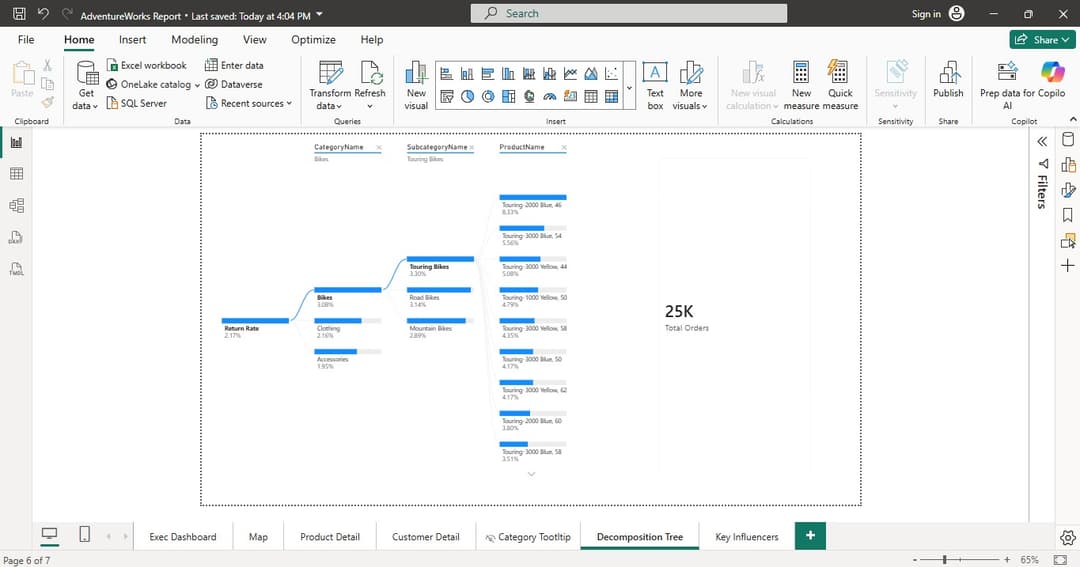
Decomposition Trees
I let the AI perform root-cause analysis on the 2.17% return rate, automatically splitting the data to find the biggest culprits across all product lines.
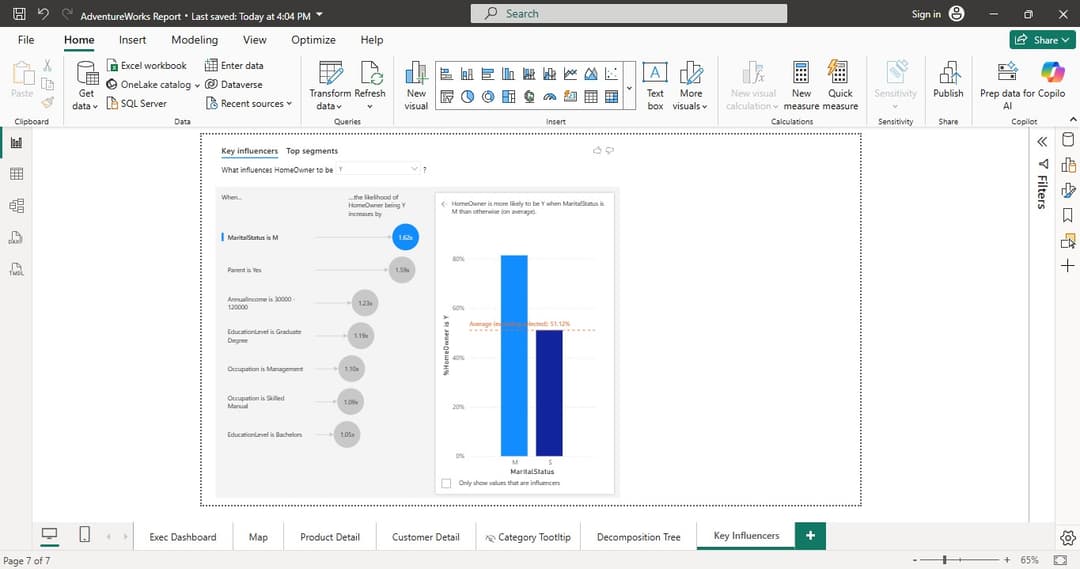
Key Influencers
Deployed embedded machine learning models to instantly identify which demographic combinations statistically possessed the highest probability of driving revenue.
*I also utilized Smart Narratives (NLP) to auto-generate readable text summaries of product trends directly on the canvas, proving that automated insight explanation is the future of BI.*